

This topic demonstrates, with code examples, how to use the OrdinalTimeXAxis in the igDataChart control. The benefit of using this axis is to dynamically change date label formats as you zoom in or out of your data.
This topic contains the following sections:
The OrdinalTimeXAxis may be used with the following series types:
The main difference between the OrdinalTimeXAxis and the TimeXAxis is that in the ordinal axis, the dates displayed are assumed to be equidistant. The TimeXAxis currently sorts and aligns them according to a chronological timescale.
Below is a code example on how to add the OrdinalTimeXAxis to the chart:
In JavaScript:
$(function () {
    $("#chart").igDataChart({
        width: "700px",
        height: "400px",
        axes: [{
            name: "xAxis",
            type: "ordinalTimeX",
            dataSource: data,
            dateTimeMemberPath: "Date",
        },
        {
            name: "yAxis",
            type: "numericY",
        }],
        series: [{
            name: "series1",
            dataSource: data,
            type: "financial",
            displayType: "candlestick",
            xAxis: "xAxis",
            yAxis: "yAxis",
            openMemberPath: "Open",
            highMemberPath: "High",
            lowMemberPath: "Low",
            closeMemberPath: "Close",
        }
       ],
   });
});
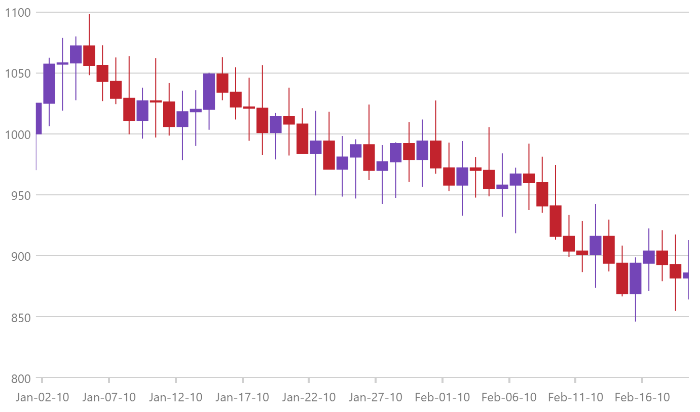
Below is a screenshot demonstrating the usage of the OrdinalTimeXAxis with a FinancialPriceSeries:

The OrdinalTimeXAxis has the LabelFormats property which is a collection of type TimeAxisLabelFormat. Each TimeAxisLabelFormat added to the collection is responsible for assigning a unique Format and Range. This can be especially useful for drilling data from years to milliseconds and adjusting the labels depending on the range of time shown by the chart.
The following lists a typical set of label formats for the given amount of time in view:
In JavaScript:
$(function () {
    $("#chart").igDataChart({
        width: "700px",
        height: "400px",
        axes: [{
            name: "xAxis",
            type: "ordinalTimeX",
            dataSource: data,
            dateTimeMemberPath: "Date",
            labelFormats: [
                {
                   format: "hh:mm:ss",
                   range: 1000
                },
                {
                   format: "hh:mm",
                   range: 60 * 1000
                },
                {
                   format: "MMM-dd-yy",
                   range: 24 * 60 * 60 * 1000
                },
                {
                   format: "MMM yy",
                   range: 365.24 * 24 * 60 * 60 * 1000
                },
                {
                   format: "yyyy",
                   range: 5 * 365 * 24 * 60 * 60 * 1000
                }],

        },
        {
            name: "yAxis",
            type: "numericY",
        }],
        series: [{
            name: "series1",
            dataSource: data,
            type: "financial",
            displayType: "candlestick",
            xAxis: "xAxis",
            yAxis: "yAxis",
            openMemberPath: "Open",
            highMemberPath: "High",
            lowMemberPath: "Low",
            closeMemberPath: "Close",
        }
       ],
   });
});
Below is a screenshot demonstrating the usage of the OrdinalTimeXAxis with a FinancialPriceSeries with label formatting:
igDataChart control to a page and bind it to data.igDataChart control.View on GitHub