

This topic demonstrates how to configure Multiple Cell Selection for both Desktop and Touch environments for the igGrid™ control.
The following table lists the topics required as a prerequisite to understanding this topic.
Touch Support for Ignite UI for jQuery Control: This topic introduces to user to the new updates that Ignite UI for jQuery controls has to support touch interactions.
igGrid Selection: This topic shows you how to enable and use igGrid Selection.
This topic contains the following sections:
The igGrid selection feature enables single and multiple cell selection in the grid. Single cell selection is achieved by clicking on a cell (Desktop) or tapping a cell (Touch) Multiple selection is available for both Desktop and Touch environments with the appropriate configuration of the grid.
The igHierarchicalGrid™ internally uses the igGrid control and is designed to use all the igGrid features. The Selection feature is not inheritable in an igHierarchicalGrid instance, which means that when the Selection is configured once in the parent grid widget. Once enabled on the parent grid then the Selection feature is available for the whole grid, including the child layouts.
The following summarizes the different approaches of how to select multiple cells in the igGrid control. Additional details are available after the summary table.
Multiple Cell Selection by dragging: Details the properties requiring configuration to enable selection of a region of cells.
Cell Selection by multiple clicks/taps: Details the properties requiring configuration to enable selection of non-contiguous cells.
Note: To enable multiple selection you need to set the
multipleSelectionproperty to true, because the default value is false.
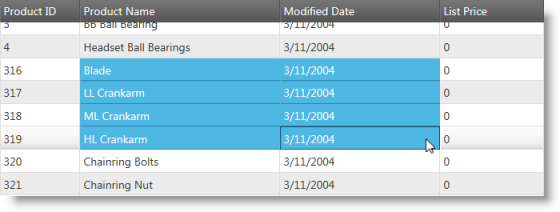
The igGrid Selection property that allows users to drag and select multiple cells under Desktop platforms is called mouseDragSelect and must be set to true.
The corresponding property for multiple cell selection via touch is touchDragSelect and must also be set to true.
Note: By default the both properties are set to
true, therefore even without explicit configuration users are able to select multiple cells.
Additional implementation details are available in the related sample.
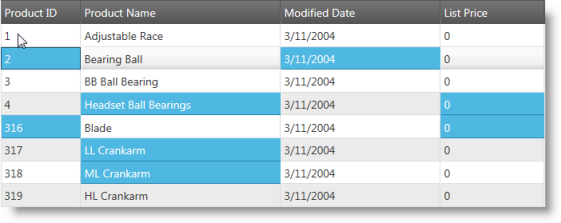
Achieving selection of non-contiguous cells (random locations) is done by holding CTRL + cell click when selecting cells in a Desktop environment. Enabling the same functionality for touch environments requires the multipleCellSelectOnClick property to be set to true. The effect of setting this property is that it ensures anytime a user clicks a new cell the existing selection preserved as if CTRL is being pressed on the keyboard. Touch-enabled environments take advantage of this behavior in order to achieve non-contiguous selection.
Additional implementation details are available in the related sample.
This section explains the igGrid Multiple Cell Selection properties.
The following table summarizes the relevant properties for enabling multiple selection for the igGrid control.
| Property | Default Value | Description |
|---|---|---|
| multipleSelection | false | Enables/disables multiple selection. |
| multipleCellSelectOnClick | false | Enable/disables multiple cell selection as if the CTRL key is being held down when a cell is clicked or tapped. |
| mouseDragSelect | true | Enables/disables selection by dragging the mouse. |
| touchDragSelect | true | Enables/disables selection by drag gesture. |
The following topics provide additional information related to this topic.
Touch Support for Ignite UI for jQuery Control: This topic introduces to user to the new updates that Ignite UI for jQuery controls has to support touch interactions.
igGrid Selection: This topic shows you how to enable and use igGrid Selection.
Enabling igHierarchicalGrid Selection: Describes how to configure Selection on the igHierarchicalGrid control.
The following samples provide additional information related to this topic.
igGrid control.View on GitHub