

The igGridExcelExporter component allows you to export data from the igGrid into a Microsoft Excel document. The export can support themes and workbook customization while reflecting data manipulated in the grid through features Sorting, Filtering, Paging, etc. The following screenshot demonstrates what an exported igGrid looks like in Excel.
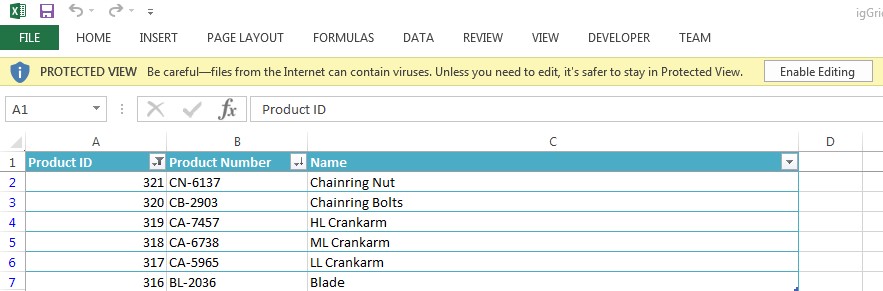
The igGridExcelExporter includes the following characteristics:
igGrid’s Filtering, Hiding, Paging, Sorting, Summaries and Column Fixing featuresigGrid’s Header and Alternate Row StylesigGrid columns to be skipped and columns that will not get applied any filteringigHierarchicalGrid or just data under expanded rowsigGrid control.The igGridExcelExporter is dependent upon the Infragistics JavaScript Excel library, so we need to add references to the library js files and the igGridExcelExporter js file:
<script src="igniteui/js/infragistics.core.js"></script>
<script src="igniteui/js/infragistics.lob.js"></script>
<script src="igniteui/js/modules/infragistics.ext_core.js"></script>
<script src="igniteui/js/modules/infragistics.ext_collections.js"></script>
<script src="igniteui/js/modules/infragistics.ext_text.js"></script>
<script src="igniteui/js/modules/infragistics.ext_io.js"></script>
<script src="igniteui/js/modules/infragistics.ext_ui.js"></script>
<script src="igniteui/js/modules/infragistics.documents.core_core.js"></script>
<script src="igniteui/js/modules/infragistics.ext_collectionsextended.js"></script>
<script src="igniteui/js/modules/infragistics.excel_core.js"></script>
<script src="igniteui/js/modules/infragistics.ext_threading.js"></script>
<script src="igniteui/js/modules/infragistics.ext_web.js"></script>
<script src="igniteui/js/modules/infragistics.xml.js"></script>
<script src="igniteui/js/modules/infragistics.documents.core_openxml.js"></script>
<script src="igniteui/js/modules/infragistics.excel_serialization_openxml.js"></script>
<script src="igniteui/js/modules/infragistics.gridexcelexporter.js"></script>
or using the bundled Infragistics JavaScript Excel file:
<script src="igniteui/js/infragistics.core.js"></script>
<script src="igniteui/js/infragistics.lob.js"></script>
<script src="igniteui/js/infragistics.excel-bundled.js"></script>
<script src="igniteui/js/modules/infragistics.gridexcelexporter.js" type="text/javascript"></script>
or just use the igLoader that will load all the needed resources for the igGrid and igGridExcelExporter:
$.ig.loader({
    scriptPath: "http://localhost/igniteui/js/",
    cssPath: "http://localhost/igniteui/css/",
    resources:'igGrid,' + 'igGridExcelExporter'
});
The igGridExcelExporter is also dependent upon the following open source libraries:
saveAs specificationBlob interface.so references to these need to be added to the page as well:
<!-- External files for exporting -->
<script src="/scripts/lib/FileSaver.js"></script>
<script src="/scripts/lib/Blob.js"></script>
You can export the entire content of a grid by passing the instance of the grid to the exporter's exportGrid static method.
$.ig.GridExcelExporter.exportGrid(
    $('#grid'),
    {
        fileName: 'igGrid',
        worksheetName: 'Sheet1',
    },
    {
        success: function() {
            alert("exporting has finished!")
        }
    }
);
The exportGrid takes three objects as arguments - igGrid instance, a user settings object (containing the file and worksheet name, etc.) and a user callbacks object, containing callbacks for the events.
Note: The only required argument for the exporter is the instance of the grid. All other properties will fall back to defaults if you do not explicitly provide values.
For more information on all the available properties of the exporter you can explore the API documentation.
The following is a preview of the final result.
View on GitHub