

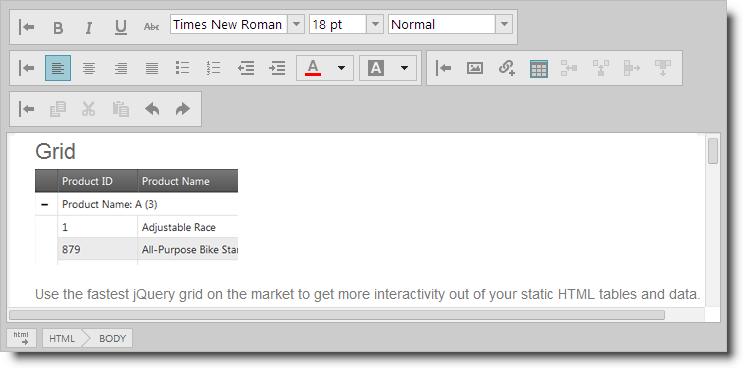
The igHtmlEditor control is a text editor control for creating and formatting online content. It has standard HTML editing capabilities.
Its options include managing the font face and size, the text alignment, as well as image, hyperlink and table support. These options are divided into four toolbars: text toolbar, formatting toolbar, insert objects toolbar, copy/paste toolbar. You can extend the igHtmlEditor functionality by creating custom toolbars.
This section contains topics covering igHtmlEditor functionality.
igHtmlEditor Overview: This topic explains the features of the igHtmlEditor.
Adding igHtmlEditor: This topic explains how to add igHtmlEditor to a web page.
Working with the igHtmlEditor: This section explains how to use igHtmlEditor.
Configuring Toolbars and Buttons: This topic explains how to configure igHtmlEditor toolbars and buttons.
Saving the HTML Content Programmatically: This topic explains how to save igHtmlEditor content to server.
Modifying Contents Programmatically: This topic explains how to modify igHtmlEditor contents by using the API.
Custom Toolbars: This topic makes an introduction to custom toolbars functionality of igHtmlEditor.
Configuring Custom Toolbars: This topic describes how to configure custom toolbar of the igHtmlEditor.
Adding a Button to a Custom Toolbar: This topic describes how to add buttons to a custom toolbar of the igHtmlEditor.
Adding a Combo Box to a Custom Toolbar: This topic describes how to add a combo to the custom toolbar of the igHtmlEditor.
Styling and Theming: This topic explains how to apply styles to the igHtmlEditor control.
MVC Helper API Reference Links: This topic provides links to the API documentation for the ASP.NET MVC helper class for the igHtmlEditor control.
Accessibility Compliance: This topic explains igHtmlEditor accessibility features and provides advice on how to achieve accessibility compliance for pages containing this control.
Known Issues and Limitations: This topic lists all known issues and limitations for the igHtmlEditor control.
View on GitHub