
ui.igColorPicker
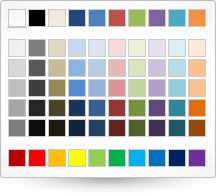
Code Sample
<!DOCTYPE HTML>
<html>
<head>
    <title>Color Picker Demo</title>

    <!-- Infragistics Combined CSS -->
    <link href="css/themes/infragistics/infragistics.theme.css" rel="stylesheet" type="text/css" />
    <link href="css/structure/infragistics.css" rel="stylesheet" type="text/css" />
    <!-- jQuery Core -->
    <script src="js/jquery.js" type="text/javascript"></script>
    <!-- jQuery UI -->
    <script src="js/jquery-ui.js" type="text/javascript"></script>
    <!-- Infragistics Combined Scripts -->
    <script src="js/infragistics.core.js" type="text/javascript"></script>
    <script src="js/infragistics.lob.js" type="text/javascript"></script>
    <script type="text/javascript">
		$(function () {
			$("#color-picker").igColorPicker();
        });
    </script>
</head>
<body>
    <div id="color-picker"></div>
</body>
</html>
Dependencies
jquery-1.9.1.js
jquery.ui.core.js
jquery.ui.widget.js
infragistics.util.js
infragistics.ui.shared.js
Inherits
-
colors
- Type:
- array
- Default:
- []
- Elements Type:
- array
Default colors.
Code Sample
//Initialize $(".selector").igColorPicker({ colors: [["#ffffff"], ["#000000"], ["#EEECE1"], ["#1F497D"]] }); // Get var colors = $(".selector").igColorPicker("option", "colors"); // Set var colors = [["#ffffff"], ["#000000"], ["#EEECE1"], ["#1F497D"]]; $(".selector").igColorPicker("option", "colors", colors); -
standardColors
- Type:
- array
- Default:
- []
- Elements Type:
- string
Standard colors.
Code Sample
			//Initialize
            $(".selector").igColorPicker({
				standardColors: ["#C00000", "#FF0000", "#FFC000", "#FFFF00", "#1F497D"]
			});

            // Get
            var standardColors = $(".selector").igColorPicker("option", "standardColors");

            // Set
			var standardColors = ["#C00000", "#FF0000", "#FFC000", "#FFFF00", "#1F497D"];
            $(".selector").igColorPicker("option", "standardColors", standardColors);
For more information on how to interact with the Ignite UI controls' events, refer to
Using Events in Ignite UI.
Note:
Calling API methods programmatically does not raise events related to their operation unless specifically stated otherwise by the corresponding API documentation; those events are only raised by their respective user interaction.
Show Details
-
colorSelected
- Cancellable:
- false
Event fired after the color is selected.
Code Sample
		//Initialize
		$(".selector").igColorPicker({
			colorSelected: function (evt, ui) {...}
		});

		//Delegate
		$(document).delegate(".selector", "igcolorpickercolorselected", function (evt, ui) {
			//return reference to igColorPicker object
			ui.owner
			//return type of the event
			evt.type
		});
-
selectColor
- .igColorPicker( "selectColor", color:object );
Select a given color to the widget.
- color
- Type:object
-
ui-igcolorpicker
- The widget base class css.
-
igcolorpicker-color
- The widget color picker class css.
-
igcolorpicker-col
- The widget colors col class css.
-
igcolorpicker-row
- The widget colors row class css.
-
igcolorpicker-table
- The widget color table class css.
-
igcolorpicker-customcolors
- The widget custom colors class css.
-
ui-colorpicker-standardcolors
- The widget default colors class css.
-
ui-colorpicker-standardcolors
- The row class css.